

Kouki
-
Posts
1,144 -
Joined
-
Last visited
-
Days Won
24
Content Type
Profiles
Forums
Events
Downloads
Posts posted by Kouki
-
-
12 hours ago, Volverston said:
After Alien's 2nd turn game crashed, before save on start of my turn.
Last visible event - Psylon appear in a view and solder reacts with Gause rifle shooting (missed), in response solder was memorized.
bug_report_2025-05-05-21h20_gc_5.29.0_unhandled_exception_0.zip 9.09 MB · 0 downloads
Thanks for the report, we'll give it a look and see what's going on.
11 hours ago, Volverston said:After loading from last auto save (turn 2 end) all went well
The seed reset probably made it so that the AI didn't do the same action that led to the crash, good to know that you can continue playing on your campaign. For the meantime we'll look into the crash
-
 1
1
-
-
8 hours ago, Xonan said:
lol, when I load it gets killed again, by a different alien. now game does finish, i thought maybe the final alien boss was a bit tougher, why not give it a 1000 hp :). this was soldier difficulty, just to see a finish, couldnt get there on veteran, my accuracy kept dropping, but i saw you gus are already wokring on that bug.
Hello there, thanks for the bug report!
By the game being stuck, do you mean that the game froze/hung or you can't finish the mission? Btw, do you have a save for the final mission when this happened? That'll help us a lot as it looks like it's not a consistently reproducible bug. -
6 hours ago, gG-Unknown said:
Problem : Servitor is able heal aliens even after he is destroyed.
How to : Soldier with Machinegun shooting at Servitor and Wraith. Both opponents are in line of fire. Use long burst. Servitor is killed then Wraight is suppressed. Servitor explodes. After the servitor explodes, the healing beam appears from place where servitor was, and heal Wraight.
FIX : make sure that units can not do reaction (action - attack, heal or whatever) after their death
Do you have a save where I can try this out? I tried reproducing this but it seems to work normally on my end
EDIT: Nvm, was able to repro -
Not sure if this is intended but this is not a bug. It's just that currently I think the game just randomizes map selection every time prior to entering ground combat, and usually this is not a problem as most missions don't provide the opportunity for retries (only indefinite ones do). Will bring this up with the team though as yeah, it doesn't make sense for base assault's layout to change but no guarantees if we'll make a separate system for it (if ever most likely post milestone 6, so it'll be quite awhile)
I'm quite partial to the idea of having missions that might require multiple attempts to clear(I quite enjoyed this aspect in Aliens:Dark Descent). Though again, this is most likely going to be up for consideration post milestone 6 as it'll quite likely require a significant amount of rework -
On 4/26/2025 at 3:37 PM, Dragorxt said:
Bruno Rey has a permanent accuracy drop after getting shield destroyed in ground combat.
It happened during the ground combat after harvester_down. I don't have the save right where it happened., it was deleted by the software.
Also, I note that after the last few updates the aliens do 80 or so damage while soldier wears heavy guardian armor. Makes it so one hit kills most soldiers.
Also, Colossus would rather go through a door than through a building wall.
You should give an award to whomever has the most game hours before launch

user_perm_accuracy_hit-126.json 1017.72 kB · 2 downloads user_harvester_down-121.json 989.46 kB · 1 download
Looks like the bug is caused by a unit getting injured (and entering wounded status) multiple times, we'll get it fixed asap
-
On 4/27/2025 at 10:59 AM, gG-Unknown said:
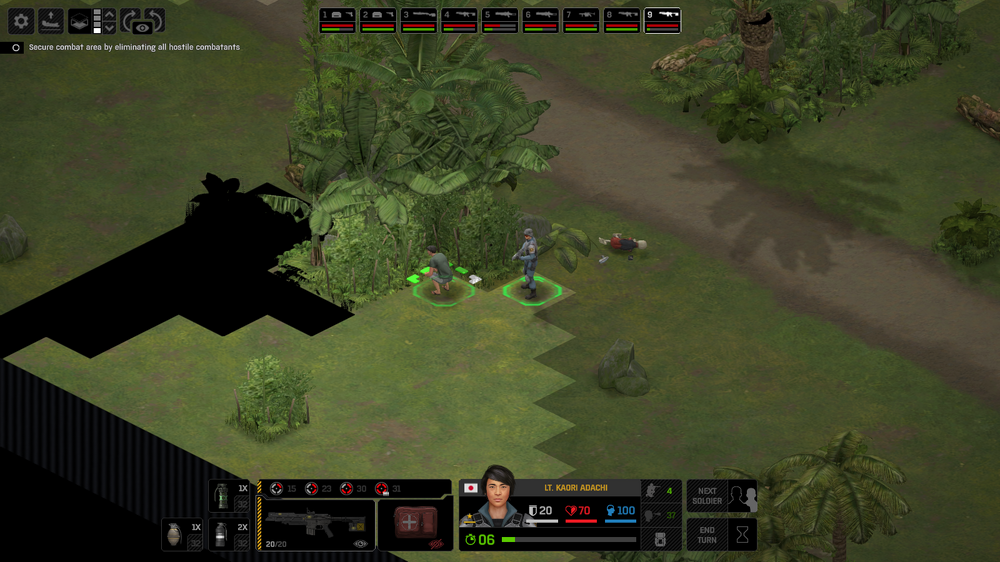
1. Most probably range for civilian interaction is set to 1 tile exactly. Therefore Interaction on adjacent but diagonal tile is too far away - it do not work.
FIX: make it so, the interaction work on all adjacent tiles,
FIX better : make the longer interaction range - 2 tiles - and replace weird artificial squeak sound by a vocal universal sound like "Heyyy !". So it looks like human characters communicate.
2. Civilian who is activated (on the run) still produce interaction icon RUN on mouse over, although it gives no interaction
FIX: Civilian who is activated do not produce interaction icon RUN on mouse over.
FIX better : Civilian who is activated (on the run) produce (a new !) interaction icon STOP on mouse over. This way player can switch civilians between run mode and stop mode. Stopped civilians crouch and do not move until ordered. e.i. Civilian has 3 modes : Initial (free will), first interaction activates the run mode, then any other interaction switches run x stop modes. This way player get higher level of control over civilians without UI clutter.
Do not work:
Do work :
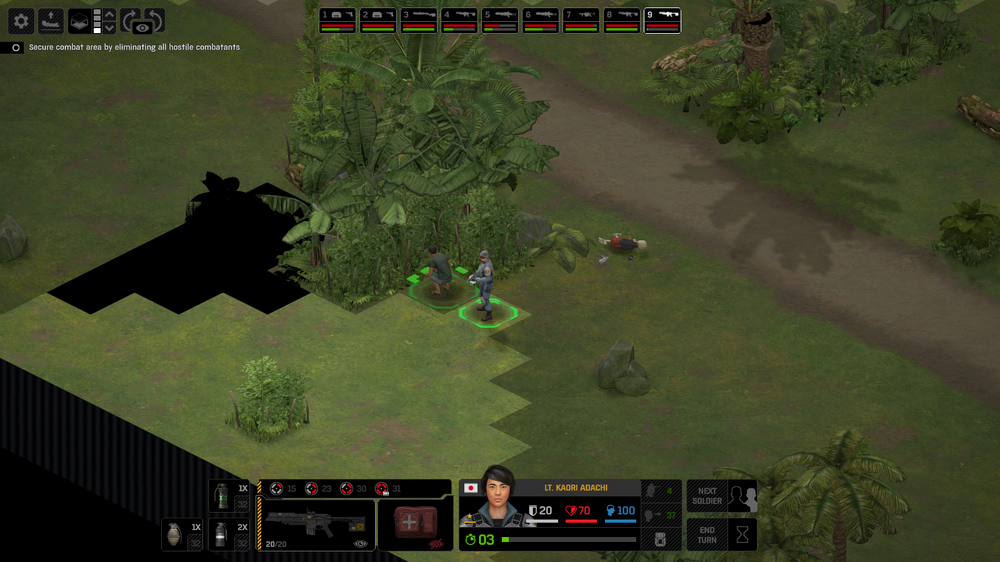
Yeah, it should definitely work diagonally, we'll fix this bug.
For the second one, yeah this is another bug that we'll have to fix (terror mission works like this, just have to make sure all missions work the same way).
For the suggested fixes, I've added it to the board of suggestions we've made for all of the community feedback stuff we might implement post milestone 6.-
1
-
-
On 4/26/2025 at 10:37 AM, Melee said:
Description: Un-assigning soldier Lt. Theodore Baros causes a null reference exception.
What Happened:
1. Loaded geoscape quicksave.
2. Selected 'Armory Screen'.
3. Selected Baros via mouseclick and then opened 'Assignment' dropdown and clicked on 'Unassigned' list item.
Additional Info: Specific soldier that is unassigned doesn't seem to matter.
bug_report_2025-04-25-22h21_st_5.28.0_unhandled_exception_0.zip 5.27 MB · 0 downloads quick-34.json 965.08 kB · 0 downloads
Thanks as always for the bug reports. We've made a fix for this that'll come out with the 5.29 patch
-
On 4/27/2025 at 3:36 AM, klaken said:
Game crashes when starting a mission
El juego generó un informe de errores
bug_report_2025-04-26-01h33_gc_5.26.0_unhandled_exception_0.zip 8.21 MB · 0 downloads
Thanks for taking the time to register and post a bug report! I took a look at the bug report and it looks like the crash happened on the enemy's turn, rather than at the start of a mission. I just wanted to make sure that what we're looking at is the correct bug report and not another one just in case!
-
On 4/25/2025 at 4:08 AM, gG-Unknown said:
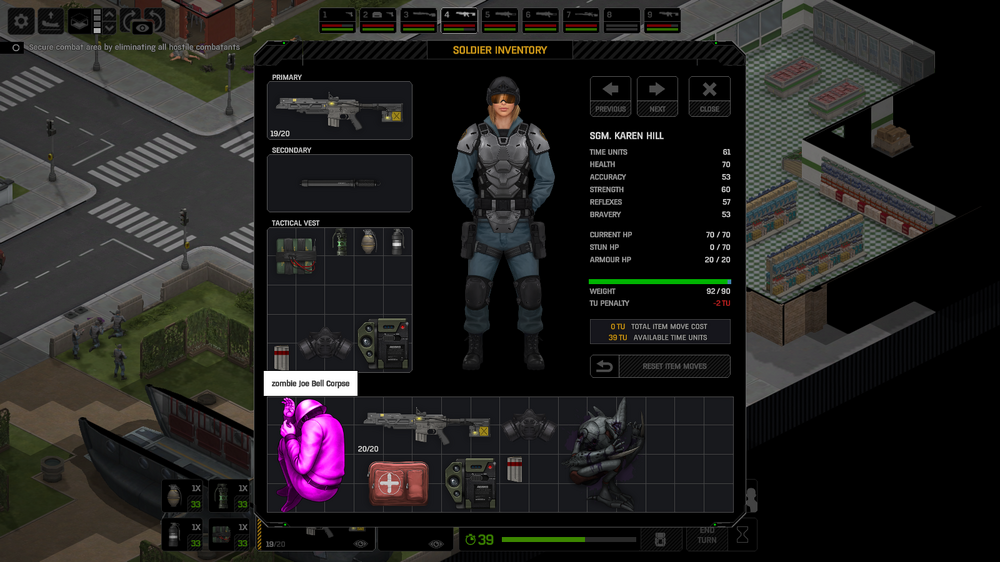
It looks like a process mistake, soldier gets transformed into zombie, zombie gets transformed into reaper, reaper is killed.
It is still the same body, you have created one spare body from thin air. That is the bug.
Well there also can be some other bugs :
- zombie gets hit by baton, play sound as hit but no result, it has a spell of immunity to melee hits ?
- when human gets infected, it takes time to develop reaper, but then when zombie gets killed it transforms into reaper immediately without any development. It is not logical.
It should be possible to kill zombie before infection process make transformation into reaper.
Yeah, that's indeed a bug. We'll get that fixed.
For the other ones as well
1. Zombies are immune to stun damage (so the stun batons don't deal any damage to them)
2. Iirc this is set this way because this is also how it was with Chryssalids in the OG Xcom.
Thanks as always for the reports! -
21 hours ago, MJM said:
Tried to do the orbital mission (with latest build) using 2 shield units. The game transported a MARS and picked different troopers than those I selected for drop ship. Anyone else having this issue?
Thanks for the bug report! Do you have a save prior to the mission so I can give it a look and see what's going on?
-
18 minutes ago, gG-Unknown said:
The point of the topic is not about left OR right side. Point is:
- lenght of the skill bar is wrong. Wrong ratio to other bars of same lenght
- way how to visually interpret the bonus - penally for better readability
When you present issue to the team, focus at root. Thank you !
Regarding these points
1. The skill bar is at the correct length, if the original accuracy is 100 then the green bar should be maxed out. The stat penalty (-5) is just overlaid on top of the actual skill bar.
2. Which means moving it to the right side will make it more readable (showing reduced skill, etc)
Will have to double check with the rest of the team first as there might be a specific reason why the penalties are shown on the left hand side here (whereas other penalties like weight and hp reduction are shown on the right side, and in the case of weight, the penalties are shown inside the border of the actual weight cap) -
5 hours ago, Melee said:
Description: Soldier's 95 accuracy bar is longer than the 98 strength bar (because she has 100). 95 is less than 98 but looks wrong.
What Happened: The red heavy armor penalty bar area appears to be adding to the bar length instead of subtracting. The red area being on the other end of the bar would also make more sense if the bar is representing 0 on the left and 100 on the right. The red area could also be inside the border of the total green area and more transparent.
![[m5.28.1] Soldier stat bars.png](https://www.goldhawkinteractive.com/forums/uploads/monthly_2025_04/m5_28.1Soldierstatbars.png.92c2d9f120096e348832cb869ab9f757.png)
![[m5.28.1] Soldier stat alternative.png](https://www.goldhawkinteractive.com/forums/uploads/monthly_2025_04/m5_28.1Soldierstatalternative.png.0ecb6c24eb9c3cd45b766b7d74ba4c9f.png)
![[m5.28.1] Soldier stat alternative 2.png](https://www.goldhawkinteractive.com/forums/uploads/monthly_2025_04/m5_28.1Soldierstatalternative2.png.a900f88ba2ff4fad685c3cac8a267e68.png)
Yeah it kinda does look better if the stat penalties are shown on the right side of the bar, will bring this up with the rest of the team and see what they think
-
14 hours ago, Melee said:
Description: Movement path generates purple tile.
![[m5.28.1] Purple tile terror map.png](https://www.goldhawkinteractive.com/forums/uploads/monthly_2025_04/m5_28.1Purpletileterrormap.thumb.png.50a8fbdad14138fa8c6979e583ec0b9d.png)
user_day_219_terror_site_purple_tile-380.json 4.1 MB · 0 downloads
Thanks, we'll get it fixed
-
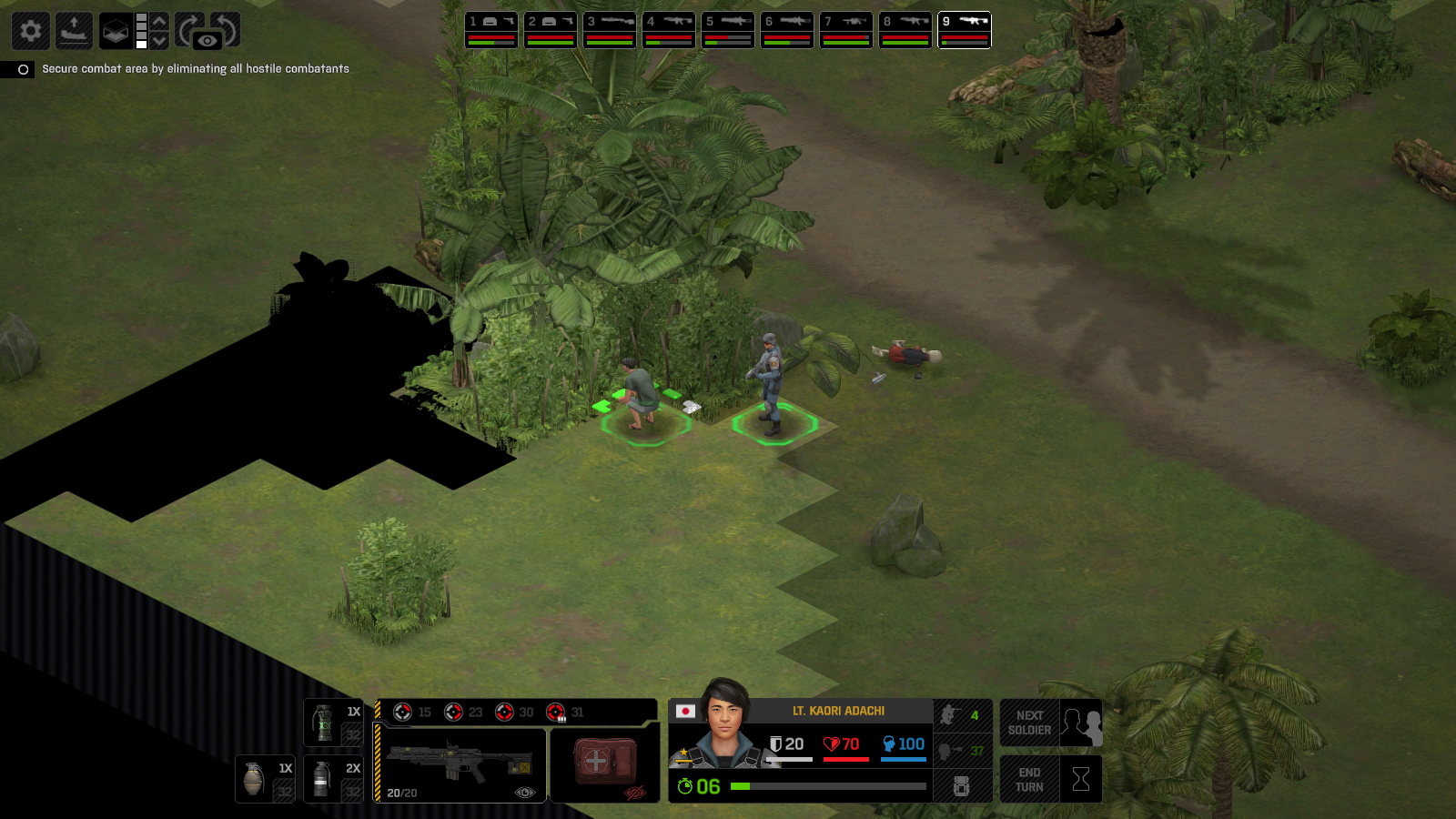
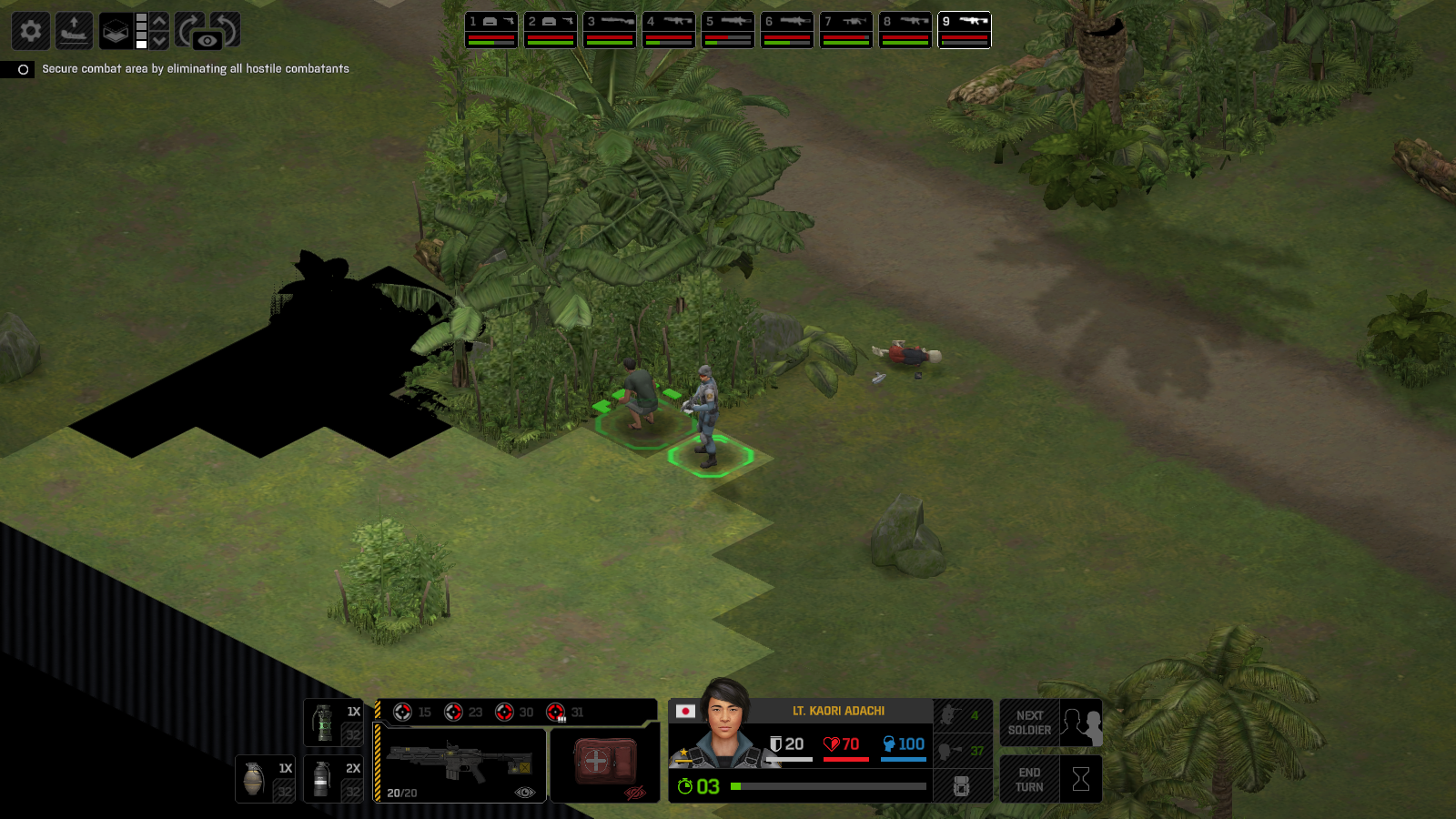
On 4/24/2025 at 7:14 AM, gG-Unknown said:
Select 9th soldier and mouse over the corpse right in front of you. You get interaction pointer "the hand". But I can not do any interaction.
Thanks, we'll give it a look and see what's going on
-
8 hours ago, Melee said:
Description: Hit chance calculation displays irregularities.
What Happened: 1. Soldier accuracy doesn't match, 2. tactical module is listed twice, 3. Heavy armor malus is listed twice. Wraith is target.
![[m5.27.0] Hit chance irregularities.png](https://www.goldhawkinteractive.com/forums/uploads/monthly_2025_04/m5_27.0Hitchanceirregularities.thumb.png.6cc847bdb252435b25f6b2984822d32d.png)
user_day_197_hit_chance-335.json 3.97 MB · 0 downloads
![[m5.27.0] Hit chance irregularities 2.png](https://www.goldhawkinteractive.com/forums/uploads/monthly_2025_04/m5_27.0Hitchanceirregularities2.thumb.png.0dfa3ef6437a0db32b2c93cd60d41ac7.png)
Thanks as always for the bug reports, as GG-unknown has kindly stated above, this is a known issue, and it should be fixed on the recently released 5.28 patch
-
On 4/20/2025 at 9:44 AM, Feetwet said:
Started a new campaign when milestone 5 was released. Can’t get the last mission to unlock. It’s day 631, no alien activity for the last 3 funding cycles. Only ever got 1 battleship. On 5.26 now.
Hello there, can you send us a copy of your campaign's save? I can take a look at it and see what's going on
-
On 3/23/2025 at 7:34 PM, Dragorxt said:
My problem is slightly different. Playing version 5.19 just turned to day 300.
I completed the sabotage mission a while ago in on day 264 but the bridge mission never pops and the bombardment keeps happening with no further way to halt the next one. I'm not sure of the version when I completed U001 so resave it here. But it was after the fix.
Did i miss something or is it a bug?
user_harvester3-155.json 1.16 MB · 0 downloads user_u001_resave-156.json 1023.41 kB · 0 downloads
Hello there, I've replied to the post you've made on X2 bug reports, just moving this one to the appropriate subforum
-
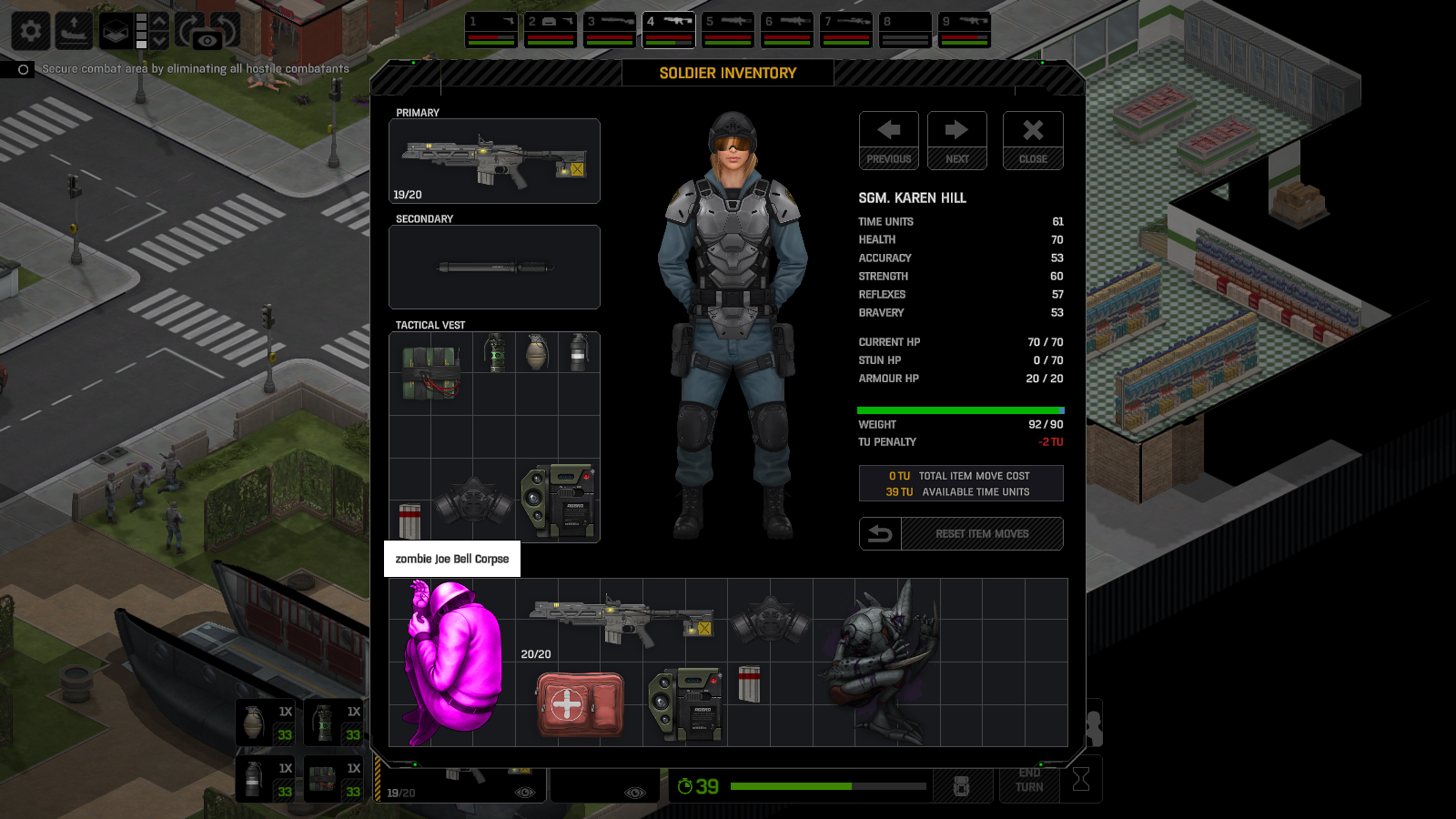
On 1/1/2025 at 6:03 AM, tinfoilhat said:
Move to a xenonaut corpse, open inventory, pick up stun baton. Attempt to discard a few items (ammo, medkit) onto the corpse inventory slots. Repeat a few times -> crash.
Another separate issue: once the game crashes, Steam won't detect the game process has exited. Attempting to run again will result in "game already running" msg.
bug_report_2024-12-31-22h43_gc_4.27.0_unhandled_exception.zip 5.04 MB · 0 downloads
Very very late reply, but this has been fixed for quite sometime now on milestone 5. I'm also moving this to the approriate section of the forum (Xenonauts 2 bug reports instead of Xenonauts 1)
-
On 1/18/2025 at 6:08 PM, Dragorxt said:
Milestone 5 (5.7.0)
A female character seems to have her Reflexes cut in half permanently from 48 to 24 then in the next battle she received a +1 reflex and it went to 25!
Not sure exactly where it happened but during a ground combat mission,
On 1/18/2025 at 6:26 PM, Dragorxt said:Happened around day 254 in second alien base mission.
Is this a known problem?
This should be fixed now, also moving this to the X2 bug report sub forum
-
On 2/13/2025 at 8:31 AM, Sagris said:
This is suppose to be in Xenonauts 2 bug reports.
I'm on Day 51, have a 184 op points and cannot spend them. Any time I try to recruit a supporter or eliminate infiltrator the corresponding sound plays, but nothing happens. Also I spent 200 op points on raising funds and nothing happened with that as well. I bought the raising funds within 2 days of buying it the first time.
Save is included.
bug_report_2025-02-12-19h24_st_5.9.0_user_f11.zip 5.51 MB · 0 downloads
On 2/14/2025 at 5:47 AM, Sagris said:Could a mod move this to the Xenonauts 2 bug forum? Apologize for posting this in the wrong bug thread.
Sorry for the very late response, but I'm replying here just in case as this bug has been fixed for quite a while now. I'm also moving this to the appropriate sub forum.
-
On 2/16/2025 at 7:15 AM, Poephoofd said:
I can't get past this. Starting auto resolve or manual UFO battle or ground mission, all crash the game. The problems begin after a successful ground mission. Before the battles/missions, the Stealth Suit research was completed but was not shown on the Engineering list, although there were plenty of resources. Then I know it is just a matter of time before the game crashes
bug_report_2025-02-15-14h42_st_5.10.0_unhandled_exception_2.zip 5.95 MB · 0 downloads bug_report_2025-02-15-14h42_st_5.10.0_unhandled_exception_1.zip 5.94 MB · 0 downloads bug_report_2025-02-15-14h42_st_5.10.0_unhandled_exception.zip 5.93 MB · 0 downloads bug_report_2025-02-15-14h36_st_5.10.0_unhandled_exception_1.zip 5.52 MB · 0 downloads bug_report_2025-02-15-14h36_st_5.10.0_unhandled_exception.zip 5.51 MB · 0 downloads bug_report_2025-02-15-14h33_st_5.10.0_unhandled_exception_1.zip 5.76 MB · 0 downloads bug_report_2025-02-15-14h33_st_5.10.0_unhandled_exception.zip 5.75 MB · 0 downloads bug_report_2025-02-15-14h29_st_5.10.0_unhandled_exception_1.zip 9.65 MB · 0 downloads bug_report_2025-02-15-14h29_st_5.10.0_unhandled_exception.zip 9.64 MB · 0 downloads bug_report_2025-02-15-14h21_st_5.10.0_unhandled_exception.zip 10.76 MB · 0 downloads bug_report_2025-02-15-14h10_st_5.10.0_unhandled_exception_1.zip 10.75 MB · 0 downloads bug_report_2025-02-15-14h10_st_5.10.0_unhandled_exception.zip 10.75 MB · 0 downloads bug_report_2025-02-15-14h04_st_5.10.0_unhandled_exception_1.zip 10.77 MB · 0 downloads bug_report_2025-02-15-14h04_st_5.10.0_unhandled_exception.zip 10.77 MB · 0 downloads
Hey there, very late reply but this bug should be fixed on the latest version of the game. This should also be on Xenonauts 2's bug report section, rather than X1, so I'm moving it there
-
On 4/6/2025 at 5:57 AM, Stormaggeddon said:
I am in fact oblivious, and it had been opening the zip in a file in the background. Here it is
bug_report_2025-04-05-15h14_gc_5.15.0_unhandled_exception_0.zip 9.87 MB · 0 downloads
Hey there, just wanted to let you know that we've already fixed this bug. I'm also moving this thread to the appropriate sub forum (xenonauts 2 bug reports)
-
On 4/17/2025 at 5:48 PM, gG-Unknown said:
Soldier standing on the Roof, I select him, then the selector is visible on the different floor is intended ?
It is hard to belive.
Ah well, asked Chris about it and to be more accurate, while it's not necessarily the intended effect, we're leaving that in place for now as it also helps the player identify where the currently selected soldier is without having to change camera layers. We might change it in the future though, depending on community feedback, etc.
-
 1
1
-
-
On 4/19/2025 at 12:14 AM, Erydian said:
Thanks for the report! We're aware of this crash and we're working on getting this fixed asap
![[m5.28.1] Purple tile terror map.png](https://www.goldhawkinteractive.com/forums/uploads/monthly_2025_04/m5_28.1Purpletileterrormap.png.2fdd7b8e5a3cebb505f1608c0b75f204.png)
![[m5.27.0] Hit chance irregularities.png](https://www.goldhawkinteractive.com/forums/uploads/monthly_2025_04/m5_27.0Hitchanceirregularities.png.b215ba58789edb6e767e6f49b1d80db3.png)
![[m5.27.0] Hit chance irregularities 2.png](https://www.goldhawkinteractive.com/forums/uploads/monthly_2025_04/m5_27.0Hitchanceirregularities2.png.4a8bec3f3881ab2b92d418dc98b6a029.png)
bug_report_2025-05-02-21h17_gc_5.29.0
in Xenonauts-2 Bug Reports
Posted
Thanks, we'll give it a look and see what's going on