


Kouki
-
Posts
408 -
Joined
-
Last visited
-
Days Won
9
Content Type
Profiles
Forums
Events
Downloads
Everything posted by Kouki
-
Thanks, yeah that's definitely a bug, we'll get that fixed! We'll take a look into the 'next soldier' button being cut-off as well
-
 Thanks for the bug report! Yeah we've been getting this bug reported again after the latest patch. We're currently working on getting it fixed!
 -
[v3.10.0 ground combat] wooden shrapnel in microgravity
Kouki replied to SoftwareSimian's topic in Xenonauts-2 Bug Reports
Thanks a lot for posting a bug report! We'll take a look into it and get it fixed -
Thanks for the bug report, we'll get it fixed!
-
Hey there, thanks for taking the time to register and posting a bug a bug report! I'll need to know what version of the game you're playing on, and if possible the save file where you couldn't launch the dropship on the mission anymore. I've tried testing it out a bit on my end and unfortunately I haven't been able to reproduce the bug on my end, so getting a save file with the reproducible bug would be a godsend. I'll link a guide below to help you find where your saves are, thanks a lot!
-
Thanks a lot! We'll get it fixed
-
Thanks! A bunch of tooltips ended up breaking somehow after Milestone 3, we've been fixing a bunch of those, we'll get to fixing this one as well!
-
Thanks for the bug report. We'll look into it and get it fixed!
-
Thanks for the bug reports fisheye! That's rather weird though, Is there more than two aircraft in the possible selection? If there are only two, pressing W to go up (and vice versa) will just cycle to the other aircraft, so it might end up looking as if it's going the opposite way?
-
Thanks for the bug report! Tested it on my end and yeah that does seem to occur. I think there might be a pathfinding issue with the MARS as it seems to be preferring to take a non-diagonal path when there are short walls. I'll bring this up with our programmers, thanks!
-
[v3.6.0] Super-ultra-wide 32:9 framebuffer bug in Geoscape
Kouki replied to fisheye's topic in Xenonauts-2 Bug Reports
Another G9 enjoyer! I'm using the older miniLED G9 as I happened to find one on sale when I was building my current setup and I've been loving it so far! For the desk I bought the Bekant corner desk from IKEA and it seems to be working well enough. Let me know if the Ergotron arm works well because I'm also hoping to get a monitor arm for my PC but I've been skeptical of buying one due to the sheer weight of the G9 :P For the bug, yeah - we're working on getting a fix around it which should drop within the next few patches -
Being able to open doors with your soldier facing away from it is intended. Though this might change in the future, depending on how things pan out
-
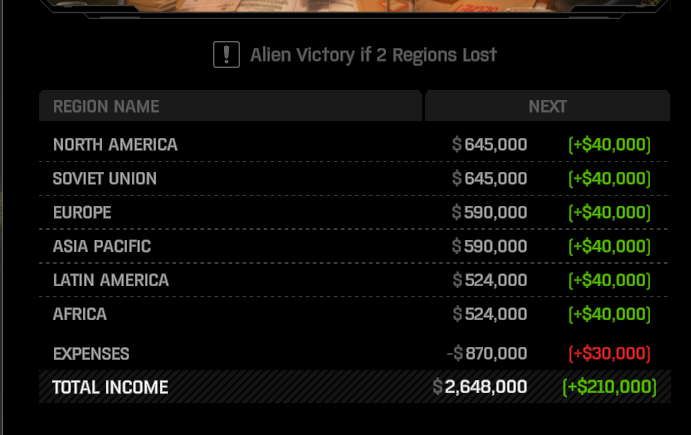
As zardoz pointed out on their reply, the funding mechanic is different from other xcom games in that your funding increases based on completed research/missions. It used to be affected by the panic in the regions but I believe that was changed based from community feedback due to panic being too punishing (and causing a death spiral/feedback loop on harder difficulties). The funding screen however, will still reflect increases in your income based from research, like on a screenshot I'm posting below (Funding increase from Xenobiology research)
-
[v3.6.0] Zooming in Ground Combat using keyboard is too fast
Kouki replied to fisheye's topic in Xenonauts-2 Bug Reports
Thanks for the feedback! I'll bring this up with the rest of the team and see what they think -
[v3.6.0] Super-ultra-wide 32:9 framebuffer bug in Geoscape
Kouki replied to fisheye's topic in Xenonauts-2 Bug Reports
Thanks for the bug report! Can you post a screenshot of the visual artifact that gets left over when you exit Steam Overlay? I might be misunderstanding what windows you're referring to but I'm also on a 5120x1440p monitor and I can't seem to repro the bug, thanks! -
[v3.6.0] Scrolling in Armory soldier list
Kouki replied to fisheye's topic in Xenonauts-2 Bug Reports
Hey there, thanks for the report! Yeah, that is indeed a bug. I'll bring this up with the rest of the team -
[v3.6.0] Inaccessible ladder in VIP mission
Kouki replied to fisheye's topic in Xenonauts-2 Bug Reports
Thanks for the bug report! I'll give it a quick look and see what's going on. -
Hey Gastav, thanks for taking the time to make a bug report. However, I'd like to ask a few things so we can figure out the problem faster. For the funding not increasing, do you mean that your monthly funding does not change even after completing certain research and missions (like the Cleaner HQ mission). Or do you mean that your monthly income is always in the red? Having a budget deficit can easily happen in the game if you're running a lot of bases and using a lot of engineering/research labs. Even though said structures provide passive income, this inflow of money is not counted in the end of the month funding report. Total income only consists of the funding from your regional support, and doesn't take into account lab/engineering idle income, selling stuff from your base stores, etc.
-
[v3.8.0 - Cleaner base] sentry gun doesn't look destroyed
Kouki replied to SoftwareSimian's topic in Xenonauts-2 Bug Reports
Yeah, looks like an old bug somehow found its way back in, I'll bring this up to our programmers and get it fixed, thanks! -
Thanks for the bug report, we'll get it fixed!
-
Thanks for the bug report, yeah the bug does happen whenever you double-click on a soldier in the Armory, and then double-click on another one. We'll get it fixed. As for starting soldiers getting lower stats then before (after the patch which lowered the max starting stats for soldiers), I suggest making a feedback thread on Xenonauts-2 General Discussion - Goldhawk Interactive so Chris can see it
-
Nice catch, we'll get this one fixed asap, thanks for the bug report!
-
Thanks for the reply! We're still unsure as to what's causing the issue as zooming in seems to work alright when we tested in on a drawing tablet. Although to be honest this one might take a while to get fixed as it is a bit lower in the priority of the stuff that we need to work on the game
-
Hey there, thanks for the bug report. Just to make sure, this is still on a Surface Pro 4 right?
-
Thanks for the bug report, we'll get it fixed!