


Chris
-
Posts
11,145 -
Joined
-
Last visited
-
Days Won
530
Content Type
Profiles
Forums
Events
Downloads
Posts posted by Chris
-
-
2 hours ago, madvitale said:
How about a simple HELP screen? Don't see one. New to this game (1 day) so maybe I missed it.
My specific issue is in turning the soldiers to face the way I want them to. Can't get that to happen consistently or easily and is Very Frustrating.
Did you play the tutorial? That should have explained it was right-click to rotate.
If you knew that already, was there a particular place where you found it wasn't working reliably.
-
 1
1
-
-
On 7/4/2024 at 12:36 PM, Nils said:
- In tactical combat, I would like to see the killcount of my soldiers for this mission and in total (i.e. in the inventory menu)
- When in geoscape mode and an enemy ufo shows up and I choose intercept, the screen shows up where I can choose which aircrafts I want to use. Deselecting aircrafts by clicking on the picture would be really great (right now I have to click the correct aircraft in the list below)
- I would like to have saved loadouts for interceptors similar to my soldiers (already suggested it, i think it would be so much qol especially in the later game)
Thanks. Yeah, 1 and 2 should be easy to do (although we'd probably use right-click for deselect) for the aircraft. 3 is a bigger feature but I'll bear it in mind for future.
-
14 hours ago, gG-Unknown said:
in the HEVY description is written down:
"The HEVY is small multi-shot rocket launcher."
I dont think it loads rockets, so it rather would be:
"The HEVY is small multi-shot grenade launcher."
For some odd reason, HEVY look very, veeeery similar to this GRENADE louncher :
http://roe.ru/eng/catalog/Security systems/Counterterrorist assets/Close combat assets/6G-30/
Include pictures and shape of ammo.
Perhaps you could even copy the proffesional text from the web page:
Special weapon of mobile assault groups to deliver massive strikes against the enemy, including those located outside the line of sight.
Thanks for the fixing the text description.
Ah yeah, the description is indeed out of date. Thanks. I'll get that fixed.
-
On 7/11/2024 at 8:11 PM, warlord4107 said:
Hello I have 2 major issues in the game not sure if they are bugs or I'm not doing something wrong I played the game over 6 months ago and did not have these issues. 1st one happens when you want to change the amount of money you start with it simple doesn't let you choose 3.5million forcing me to use the easiest level which gives me 3million 2nd major bug when going to load the drop ship when I go to choose the soldier I want on the ship it knocks them off leaving an opening not taking the full number on board. It also won't let you choose which units to put on so I can't even put a Mars unit on once its been built these issues did not exist in the game I played 6 months ago. Is there a fix coming out or has anyone else seen these issues.
Could you explain the first problem a little more? Is the dropdown on the New Campaign screen just not working for you? I just tested it in the Steam version and it seemed to work for me.
-
We've released an update for Milestone 4 that addresses several balance complaints users have been reporting, as well as fixing a number of bugs. Although we're now focused on Milestone 5, we'll continue to investigate and fix any serious bugs players encounter in Milestone 4 - so do please report any issues you experience!
The consolidated changelog from versions 4.13 to 4.16 can be found below. As always, a big thanks to everyone on our Experimental branches who helps test these builds before gneral release!
Balance / Gameplay Changes:
-
Strategy:
- Added research text for the Ultradense Alloys and Biosurvey Array research projects.
- The player's base funding now passively increases by roughly ~$120,000 per month, split across the six funding regions. This should help ease the mid-to-late game funding issues (unfortunately this change may only take effect in new campaigns).
- Reinforced Shield now unlocks properly from Ultradense Alloys.
-
Tactical Combat:
- We've removed grenades from all types of Wraith except Wraith Leaders and Wraith Officers to reduce enemy grenade spam. In Milestone 5 we'll add a small chance that standard Wraiths can also spawn with a grenade so the player will still have to consider the possibility, but recent AI upgrades coupled with every Wraith having a grenade had made them much more dangerous than intended.
- Guardian armour now offers 15 Armour, and +15 more with heavy armour (previously it was 12, with +12).
- Exosuit armour now offers 25 Armour and +25 with heavy armour (previously 25, and +18).
- Colossus armour now offers 40 Armour (previously 30), and when upgraded it has 70 Armour (previously 60).
- Significantly reduced maximum miss deviation on the HEVY Launcher.
- Stun Gun now gets +6% hit chance for each tile closer than max range (previously +4.5%)
- Electroshock Pistol now does 40 EMP damge (up from 35), and Electroshock Rifle does 50 EMP damge (up from 40).
- Electoshock Grenade EMP damage reduced to 45 (from 50)
- Updated Electroshock Pistol / Rifle so they have broadly the same accuracy and fire modes as a standard Pistol or Rifle (this is a slight buff), but their range remains as before (i.e. shorter than a standard pistol / rifle).
- Cleaner SMG range reduced to 16 tiles (previously 20).
- Increased Armour Destruction on Reaper melee attacks to 15 (from 5).
- Sentinel Module now has a 360-degree vision arc (and the item tooltip reflects this).
- Added a death sound for the Servitors so they no longer scream like humans.
- The crosshair / crosshair text now always draws on top of any text displaying the stopping chance of intervening objects along a shot path.
Bugfixes:
-
Strategy:
- Fixed an issue where moving items in the soldier inventory could lead to "ghost" temporary duplicate items being created, which could cause crashes if interacted with.
- Fixed aircraft once again not regenerating inbuilt armour unless they had extra armour equipped.
- Fixed replacing a weapon on the soldier equip screen not also updating the ammo clips if the weapon in question was an upgraded Laser.
- Fixed the game incorrectly showing the "quicksave completed" popup if you quicksaved with another pop-up open (as that will prevent the quicksave being made).
- Fixed the Fusion Lance engineering project not being cancellable.
-
Air Combat:
- Fixed multi-shot UFO weapons in the air combat (e.g. on Cruisers) continuing to fire the remainder of the burst even if you pause the game, or destroy the UFO.
-
Tactical Combat:
- Fixed a hang on the AI turn that could hardlock the entire game.
- Fixed occasional crash linked to firing the HEVY Launcher.
- Fixed grenade throw mode sometimes getting stuck displaying a 0% hit chance.
- Fixed Secton eyes always glowing purple when the unit is moving, even if Psionic Triangulation is not active.
- Fixed an AI bug that could sometimes cause AI units to move to a good attacking position and then just not fire their weapon.
- Fixed an issue with the Harvester UFO on Dockyard maps where certain interior tiles could end up not being walkable (these were shipping containers by incompletely deleted by the UFO when it spawned).
- Fixed a number of gameplay issues in the Tropical maps - e.g. there were a number of vegetation items in our newer maps that wouldn't remove properly if destroyed, and it was also possible for units to walk on the swamp water tiles if they were damage.
- Fixed a bug where the player was not being given notifications when alien units suffered a morale break and panicked, fled or berserked if they were not directly in the vision cone of a Xenonaut soldier. This "fixes" a bug where suppressed Sectons were still performing overwatch fire - what is actually happening here is that they're suffering a morale break after the death of a nearby Psyon and are berserking, but the game wasn't giving a notification.
-
1
-
Strategy:
-
2 minutes ago, Skitso said:
Ah, ok well that makes sense.
Sorry, I wasn't aware damage absorbion was a thing. That's great!
Not sure if it applies in this case tbh; the fence has a stopping chance of less than 100% so I’m not completely sure how it works off the top of my head.
-
5 hours ago, Skitso said:
Throwing a demo charge like this and you'll miss two green targeting tiles.
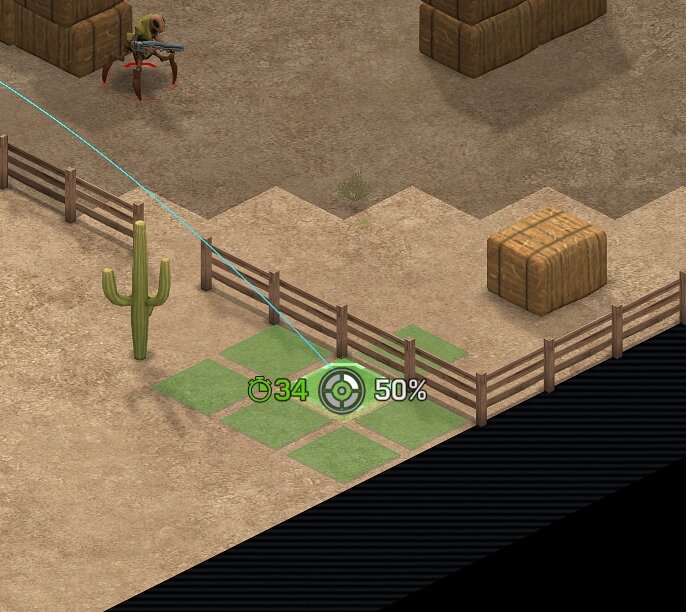
That's because the fence absorbs a lot of the blast, isn't it? I assume a unit stood in either of those tiles won't take any damage?
1 hour ago, gG-Unknown said:Missing mechanic is wild.
I tryed to ask Chriss to discloese how it works, several times, make miss table public, but no response.
I thing it is bad approach, in general.
As far as I understand system of miss-hit mechanic it works like this :
player see 50% chance to hit the tile.
throw the dice to get a number it it is under 51 then you hit the tile, otherwise you miss.
Size of miss is defined by a hidden table (or formula) so target closer to max range has also bigger scatter range.
Which means, example ! , in your case, you can see 50% chance to hit, but if you miss then you roll another RANDOM chance 1-10 tiles of miss. it is the size of miss and has nothing to do with first chance you roll.
Which means, you can throw at 50% miss scatter 1 tile, then throw at 98% miss scatter 10 tiles.
Unfortunate system. I think Chriss should disclose this rrules, let brainstorm to improve it.
That's got nothing to do with the bug being reported.
-
On 7/13/2024 at 4:08 AM, Token said:
damn it, seems to be reacuring.
Edit: Guess i should have uploaded the save, sorry.
A workaround was to trigger the enemies overwatch with a soldier.
bug_report_2024-07-13-05h07_gc_4.16.0_unhandled_exception.zip
Thanks for the bug report. I can't seem to reproduce this though. Would you mind telling me how you can do it - which save you load, and whether you do anything else before you press End Turn?
-
This update is also only accessible by switching to our Experimental branches (instructions on how to do so here) - although please be aware they have slower load times and worse performance than normal builds due to the extra logging they contain!
Changes:
- Fixed multi-tile doors (ATLAS Base, Alien Base, UFO main doors etc) blocking movement after being opened.
- Significantly reduced maximum miss deviation on the HEVY Launcher.
- Fixed occasional crash linked to firing the HEVY Launcher.
-
48 minutes ago, Melee said:
To go along with the electroshock unlock, I think there needs to be an upgraded melee version of the starting stun baton (stun axe/hammer/maul ? Maybe do damage and stun.), otherwise the new reflex-centric units are encouraged to switch to the firearms for better stun damage but now are at an accuracy disadvantage.
Yeah, that was mentioned in the feedback thread and I think it's a good idea. We'll probably add one in Milestone 5.
-
3 hours ago, kyu bey said:
Bug applied to phantom & gemini damaged original armor since angel doesn't have any.
Armor will only be fixed normally when i swap one of the hardpoint to an armor -- let it chill for a few hours in game time.Thanks. This will be fixed in the next hotfix.
-
Thanks for the feedback everyone, it's really useful stuff. I'm making some balance changes as a result of this feedback which will arrive in the next hotfix, and there's plenty of things to think about for Milestone 5 too.
The Wraiths doing less grenade spam is already out on the Experimental branch. I agree about the missions in the second half of the game being a bit repetitive, but that's something we'll be looking at in Milestone 5. I'll be tweaking a number of weapons in the upcoming hotfix, and making advanced Xenonaut armour offer a bit more protection.
I'm also going to set Xenonaut funding to passively increase by +$20k per region per month (so +$120k per month total), which should help the mid-to-late game funding situation being so tight.
-
 1
1
-
-
16 hours ago, Nobody6 said:
I'm going to add numbers here.
1. Uninstaller.
I remember reading, that if I run into trouble after doing an update, I should do a clean install and remove settings and stuff.
So I ran the uninstaller, and it asked me if I wanted to keep my savegames and settings. It also said, that if I chose "no" it would also remove the folder. I clicked "no" and nothing was removed. So either the uninstaller is bugged or the description in incorrect.
2. Hazmat cleaners.
You misunderstood. Not through, but over. Lots of half-height cover (logs, 2 windows, maschines, tables, fence/wall). Totally possible to pull such a shot of with high stats - which hazmat cleaners have, I belive. Very annoying when that happens half a dozen times in a row. What surprised me was, that there were hazmat cleaners at all, on a abduction mission! Which was also my first (non-scriped) mission of the campain.
I will check for savegames later.
Thanks. I've fixed most of the map errors now and those fixes will be included in the next patch.
What difficulty are you playing on? The enemies get a significant accuracy buff if you're playing on Commander, and a reasonable accuracy buff on Veteran. Also, remember that shots only count the one highest intervening cover item - so if there's a 50% blocking item, you can add as many 40% blocking items into the shot path as you like and the accuracy will only be reduced by 50%.
-
This update is also only accessible by switching to our Experimental branches (instructions on how to do so here) - although please be aware they have slower load times and worse performance than normal builds due to the extra logging they contain!
Changes:
- The player's base funding now passively increases by roughly ~$120,000 per month, split across the six funding regions. This should help ease the mid-to-late game funding issues (unfortunately this change may only take effect in new campaigns).
- Guardian armour now offers 15 Armour, and +15 more with heavy armour (previously it was 12, with +12).
- Exosuit armour now offers 25 Armour and +25 with heavy armour (previously 25, and +18).
- Colossus armour now offers 40 Armour (previously 30), and when upgraded it has 70 Armour (previously 60).
- Stun Gun now gets +6% hit chance for each tile closer than max range (previously +4.5%)
- Electroshock Pistol now does 40 EMP damge (up from 35), and Electroshock Rifle does 50 EMP damge (up from 40).
- Electoshock Grenade EMP damage reduced to 45 (from 50)
- Updated Electroshock Pistol / Rifle so they have broadly the same accuracy and fire modes as a standard Pistol or Rifle (this is a slight buff), but their range remains as before (i.e. shorter than a standard pistol / rifle).
- Cleaner SMG range reduced to 16 tiles (previously 20).
- Increased Armour Destruction on Reaper melee attacks to 15 (from 5).
- The crosshair / crosshair text now always draws on top of any text displaying the stopping chance of intervening objects along a shot path.
- Reinforced Shield now unlocks properly from Ultradense Alloys.
Bugfixes:
- Fixed a crash that could occur on completion of a tactical mission.
- Fixed a crash that could occur when trying to load an older campaign into version 4.14.0.
- Fixed being unable to reload weapons in the tactical inventory if you were playing a campaign that was started prior to version 4.14.0.
- Fixed an issue where units could move diagonally through multi-tile doors without opening them.
- Fixed a number of gameplay issues in the Tropical maps - e.g. there were a number of vegetation items in our newer maps that wouldn't remove properly if destroyed, and it was also possible for units to walk on the swamp water tiles if they were damage.
- Fixed aircraft not regenerating inbuilt armour.
-
The amount of grenade spam you'll be facing will be reduced in the next patch too.
-
On 7/5/2024 at 10:16 AM, Warie_W00kie said:
Not sure if this is a bug or it just wasn't implemented, Completing Harvester research didn't mention Reinforced Shield nor can it be built in Engineering.
Thanks, I'll get this fixed.
-
22 hours ago, Nobody6 said:
This Bug is still present in v4.12.2.
Thanks. We've not had a chance to look at the 5:4 aspect ratio issues yet, but it's on our to-do list.
-
On 7/5/2024 at 8:43 PM, kyu bey said:
Start a new mission -- go outside ship for a bit -- try to use grenade = all type of grenade on that soldier is 0% no matter where i aim.
Bug appear & disappear as it pleases at times. For example this time i press f11 to create the zip and opened the game's folder -- back to the game = hit rate is back to normal.
Sometimes doing something else with another soldier solved the bug. Sometimes not.
Bug so far 100% disappeared on that soldier next turn.
I uploaded 2 zip because i forgot which one is which =_=". This(^) one is the one with user f11 name file i think?
The other one is crash when i forgot to be patient and moved right after i opened an abduction tube. So these happened at the same time:
Civilian moving, my soldier moving & alien overwatch shooting that moving civilian.bug_report_2024-07-05-22h38_gc_4.12.2_user_f11.zip bug_report_2024-07-05-22h42_gc_4.12.2_unhandled_exception.zip
Thanks for submitting the bug report, we're looking at it now. Unfortunately we can't reproduce the bug at our end - would you be able to test and see if you can reproduce the crash from your saves please?
-
23 minutes ago, Bookshelf11 said:
Just failed a terror mission and lost the game at day 270 because I failed a andron/wraith terror mission. My guys got absolutely slaughtered by wraiths, even taking on cruisers full of fusion gun lizards at worst, only net me 2 dead troops. The sheer amount of grenades around corner and out of sight lines when they get close combined with them being extremely hard to kill at range makes it where there is no safe when it comes to them. My dropship of 10 troops and 2 rovers, all clad in guardian armour with fusion guns never stood a chance, androns I don't think even got a single kill.
Every alien has a counter to a degree, Sebillian are tanky but suck at long range combat, Androns are tanky but have low hp and seem to neglect cover like they did in 1 and also EMP damage, Secton/Psyons are dangerous when together but keep em separate and they're easier to deal with, Reapers are extremely dangerous up close but have no ranged ability and take hardly any cover.
Wraiths however don't really have a drawback, yeah they only have 90 health but when you can't hit them they can take far more shots to actually down, at close range they use grenades whenever they can even at single troops which also destroys both armour and weapons so that hurts even more, if you get out of grenade range they can still really hurt you with plasma and now you can't actually hit them and even if you get close enough to flashbang them the flashbang doesn't actually break their cloak. Alone they're pretty dangerous but in the numbers they get deployed at, they're easily the most dangerous and most expensive in terms of replacing gear to fight.
Yeah, I think they are. You're not the only person saying this. They're not meant to be spamming grenades everywhere; I think one of our recent AI upgrades made them realise how effective grenades were and now they're throwing them everywhere.
I'm going to set it up so not every Wraith has a grenade any more, which should make them manageable.
-
This update is also only accessible by switching to our Experimental branches (instructions on how to do so here) - although please be aware they have slower load times and worse performance than normal builds due to the extra logging they contain!
Changes & Fixes:
- We've removed grenades from all types of Wraith except Wraith Leaders and Wraith Officers, as the AI is now clever enough to know how effective grenades are and was using them too often. In a future update we'll add a small chance that other types of Wraith can also spawn with a grenade, but it'll remain a small chance.
- Fixed another lockup that could occur during the AI turn.
- Fixed weapons in the tactical inventory backpack not being able to be moved to the equip slot or be dropped on the ground.
- Fixed grenade throw mode sometimes getting stuck displaying a 0% hit chance.
- Fixed an AI bug that could sometimes cause AI units to move to a good attacking position and then just not fire their weapon.
- Fixed an issue with the Harvester UFO on Dockyard maps where certain interior tiles could end up not being walkable (these were shipping containers by incompelely deleted by the UFO when it spawned).
- Fixed the Fusion Lance engineering project not being cancellable.
- Fixed a white square briefly appearing when assigning soldiers on the Soldier Equip screen.
-
1
-
12 minutes ago, Mercostol said:
I am one of those people who hate, yes hate, the little click sounds on the UI of most games.
So please allow me to disable it, even if it's just modding the gameI refunded the ufo:extraterrestrials 2 game because the sounds were so horrible.
Doesn’t one of the UI sliders already allow this?
-
1
-
-
15 minutes ago, gG-Unknown said:
some wording bumped to my nose and UI details:
Weapon description - Hit Bonus + xx% >> it is no bonus, actually it is a "penalty for long range shot" . Perhaps make it shorter and two words as "Long range" then number make negative as : -4,25%
Example:
Current
Hit bonus +4,25%
Proposed
Long range -4,25%
Just to pick up on this because there seems to be confusion - no, this isn't how it works. You get +4.25% for each tile closer to the target than maximum range.
-
On 6/30/2024 at 11:12 PM, CaptainSPrice said:
@Chris With your currect progress of coding etc. Milestone 5 it's gonna be a final released or there are gonna be more releases?
There'll be at least one more release after Milestone 5, but Milestone 5 should allow people to complete the campaign.
-
This update is also only accessible by switching to our Experimental branches (instructions on how to do so here) - although please be aware they have slower load times and worse performance than normal builds due to the extra logging they contain!
Gameplay Changes:
- Added research text for the Ultradense Alloys and Biosurvey Array research projects.
- Sentinel Module now has a 360-degree vision arc (and the item tooltip reflects this).
- Added a death sound for the Servitors so they no longer scream like humans.
- Bug reporter tool will now delete excess Xenonauts 2 crash zips if you have more than 25 on your machine.
Bugfixes:
- Fixed a hang on the AI turn that could hardlock the entire game.
- Fixed Secton eyes always glowing purple when the unit is moving, even if Psionic Triangulation is not active.
- Fixed an issue where moving items in the soldier inventory could lead to "ghost" temporary duplicate items being created, which could cause crashes if interacted with.
- Fixed replacing a weapon on the soldier equip screen not also updating the ammo clips if the weapon in question was an upgraded Laser.
- Fixed the game incorrectly showing the "quicksave completed" popup if you quicksaved with another pop-up open (as that will prevent the quicksave being made).
- Fixed multi-shot UFO weapons in the air combat (e.g. on Cruisers) continuing to fire the remainder of the burst even if you pause the game, or destroy the UFO.
- Fixed a bug where the player was not being given notifications when alien units suffered a morale break and panicked, fled or berserked if they were not directly in the vision cone of a Xenonaut soldier. This "fixes" a bug where suppressed Sectons were still performing overwatch fire - what is actually happening here is that they're suffering a morale break after the death of a nearby Psyon and are berserking, but the game wasn't giving a notification.
-
1
Issues found
in Xenonauts-2 Bug Reports
Posted
Can you try this? You might have some old files from an old campaign that are causing problems. The game certainly shouldn't be locking up when you try to change the customisation options. It seems to work fine for me on GOG Galaxy too.
As for the soldier being kicked off the dropship - as Skitso says, is this for a Rescue Soldiers mission, or when the dropship lands back from the ATLAS base mission? Did the soldier take damage during the last combat?