

Kouki
-
Posts
1,997 -
Joined
-
Last visited
-
Days Won
59
Content Type
Profiles
Forums
Events
Downloads
Everything posted by Kouki
-

[Experimental V6.12.0 Geoscape] Crash on clicking any operative
Kouki replied to Goober1's topic in Xenonauts-2 Bug Reports
Yeah, there was a bug in 6.12 that causes a crash when you interact with the regional supporters (or the region in the UI), we've made a fix for this in 6.13 so it shouldn't be a problem any longer. -
Thanks for the report! We'll look into this and try to get it fixed as soon as we can.
-
Thanks for taking the time to post a bug report! Yeah - we're aware of this issue and this crash will get patched out on the next hotfix.
- 1 reply
-
- 1
-

-
[Experimental 6.10.0 Geoscape ] - Crash on Agent selections
Kouki replied to ADederer's topic in Xenonauts-2 Bug Reports
Thanks for the bug report! Yeah, it looks like clicking on any part of the regional supporter UI causes a crash atm, we'll get this fixed. -
Thanks for the report! We're aware of this issue and we're working on getting it fixed asap
-
Thanks for the report! We're aware of this issue and we're working on getting a patch out to fix the bug that's causing these crashes
-
Hello there, thanks for the report. We'll get this fixed asap
-
Thanks for the bug report! Yeah, the tutorial is currently broken, we'll fix it asap.
-
Looks like the save is after the panic increase, by any chance do you have one before the save so we can figure out what might've caused it?
-
Sabotage, roofs not going transparent. Deployment displaced
Kouki replied to ADederer's topic in Xenonauts-2 Bug Reports
Thanks for the bug report! Both of these are known issues and we're getting it fixed as soon as we can. -
[experimental 6.9.1 - strategy] Reduce Tension QoL
Kouki replied to Skitso's topic in Xenonauts-2 Bug Reports
Yeah, the reduce tension operation can be hard to see, we have this on our planned fixes but I'll add your suggestion to the possible things to do to make it easier to use said operation. -
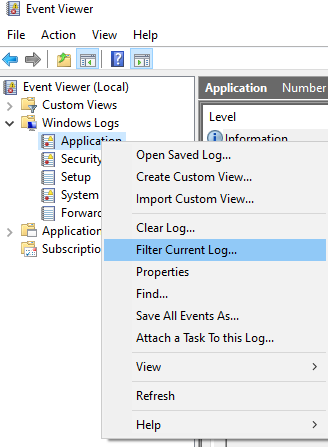
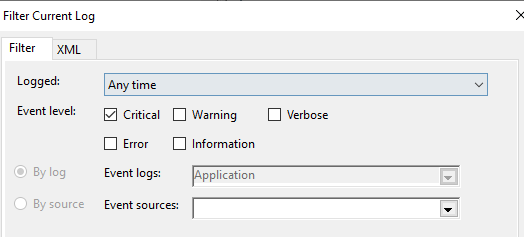
Hello there, I made a reply on the previous post you've made regarding the same hard crash. We'll need a bunch of logs from you as the one the game writes does not include much hardware information. Minidumps - This is usually in C:\Windows\Minidump, but you can also type in %systemroot% in the start menu's search box and it will open your Window's directory, there should be a folder named Minidump there, which should contain the logs (should be a .dmp file) for your most recent hard crashes. Event Viewer Logs - Type in "Event Viewer" in your start menu's search box (or you can windows + r key then type "eventvwr.msc", then Expand Windows Logs -> click on Application, then right click -> Filter Current Log -> Tick the 'Critical' check box and click OK. It should filter it out to only the important errors. On the right hand side of the Event Viewer window, click on Save Filtered Log File As.., then upload the .evtx file here so we can take a look.
-
Thanks for the bug report, we'll look into it and get it fixed asap
-
[experimental 6.9.1] Open door pathing issue
Kouki replied to silencer's topic in Xenonauts-2 Bug Reports
Yeah, the way the door functions right now is not necessarily a bug, but a side effect of the changes made. I tested the TU cost though and it seems to be accurate? Or do you mean that if a soldier goes through an open door (like the first soldier in your screenshot), that said door should be opened again after they go through it? -
[experimental 6.9.1] Air combat no deployment area
Kouki replied to silencer's topic in Xenonauts-2 Bug Reports
Thanks, we'll fix this asap. Though it looks like there's a deployment area, it's just somehow barely visible. -
[experimental 6.9.1 - tactical] Invisible MARS corpse
Kouki replied to Skitso's topic in Xenonauts-2 Bug Reports
Thanks, we'll fix this asap -
[experimental 6.9.1 - tactical] VIP not spotted one enemy turn.
Kouki replied to Skitso's topic in Xenonauts-2 Bug Reports
Thanks, we'll give it a look and get it fixed -
[experimental 6.9.1 - tactical] Glass door breaks when opened
Kouki replied to Skitso's topic in Xenonauts-2 Bug Reports
Thanks, might be a specific door in the data raid mission? Tested a data raid map and it was working fine on my end. Can you recall which door it was? (was it a front door? etc. will help a lot over looking at each door manually ) -
[experimental 6.9.1 - tactical] ATLAS base door frame issue
Kouki replied to Skitso's topic in Xenonauts-2 Bug Reports
Yeah, this is most likely related to a known issue with pathfinding showing paths through shroud. We're still working on fixing said bug, but I'll bring this up with the team as well. -
[experimental 6.9.1] Pathing issue - ATLAS base
Kouki replied to silencer's topic in Xenonauts-2 Bug Reports
Thanks for the report! Yeah, this is most likely related to the bug where you can path through shroud, we're still working on fixing it. -
Yeah, not sure if this is a bug, but I'll bring it up with the team
-
Game crushes always when reaching alien ship- ground combat
Kouki replied to Voytek's topic in Xenonauts-2 Bug Reports
Hello, thanks for taking your time to post a bug report! Just wanted to make sure that this is indeed a bug on Xenonauts 2, because it looks like the game you've been playing is Xenonauts 1? -
Thanks for the response, we'll need more information as the game's crash logs isn't very helpful for hardware related crashes. For this we'll need the following. Minidumps - This is usually in C:\Windows\Minidump, but you can also type in %systemroot% in the start menu's search box and it will open your Window's directory, there should be a folder named Minidump there, which should contain the logs (should be a .dmp file) for your most recent hard crashes. Event Viewer Logs - Type in "Event Viewer" in your start menu's search box (or you can windows + r key then type "eventvwr.msc", then Expand Windows Logs -> click on Application, then right click -> Filter Current Log -> Tick the 'Critical' check box and click OK. It should filter it out to only the important errors. On the right hand side of the Event Viewer window, click on Save Filtered Log File As.., then upload the .evtx file here so we can take a look.
-
Yeah, will bring this up with the rest of the team. Seems like you can only fit 3 ARES for endgame mission. For the dropship showing up in endgame, it should be fixed on 6.9. Campaign saves are unfortunately not compatible, so you'll need to switch to Experimental Legacy to keep on playing.
-
[experimental MILESTONE 6 [6.9.0] - 12 SEP 2025] Tutorial
Kouki replied to Alienkiller's topic in Xenonauts-2 Bug Reports
Yeah, the tutorial is completely broken right now. We'll get it fixed.